

A screen in the wrong place gets walked past. It can be bright, sharp and full of good content, and still be ignored if it sits where nobody slows down.
That is the problem with most in-store digital signage. The screens go where there happens to be free wall, not where shoppers actually stop, wait or decide. The result is retail digital signage that looks good in the installation photos and does very little on a Tuesday afternoon.
Placement is also about to matter more. IAB Europe’s draft in-store standard, which was open for public comment this autumn, uses the number of placements in a store and how many shoppers pass them as part of how the audience is counted. Where a screen goes now affects how its audience is counted, not just how it looks.
This guide takes a store zone by zone, from the window to the checkout. For each one, it says what a screen is for, what to look out for and which LamasaTech display suits the spot.
Jump to: The window · The entrance · The main floor · Aisle ends · The checkout · The Co-op example
Where should in-store digital signage go in a store?
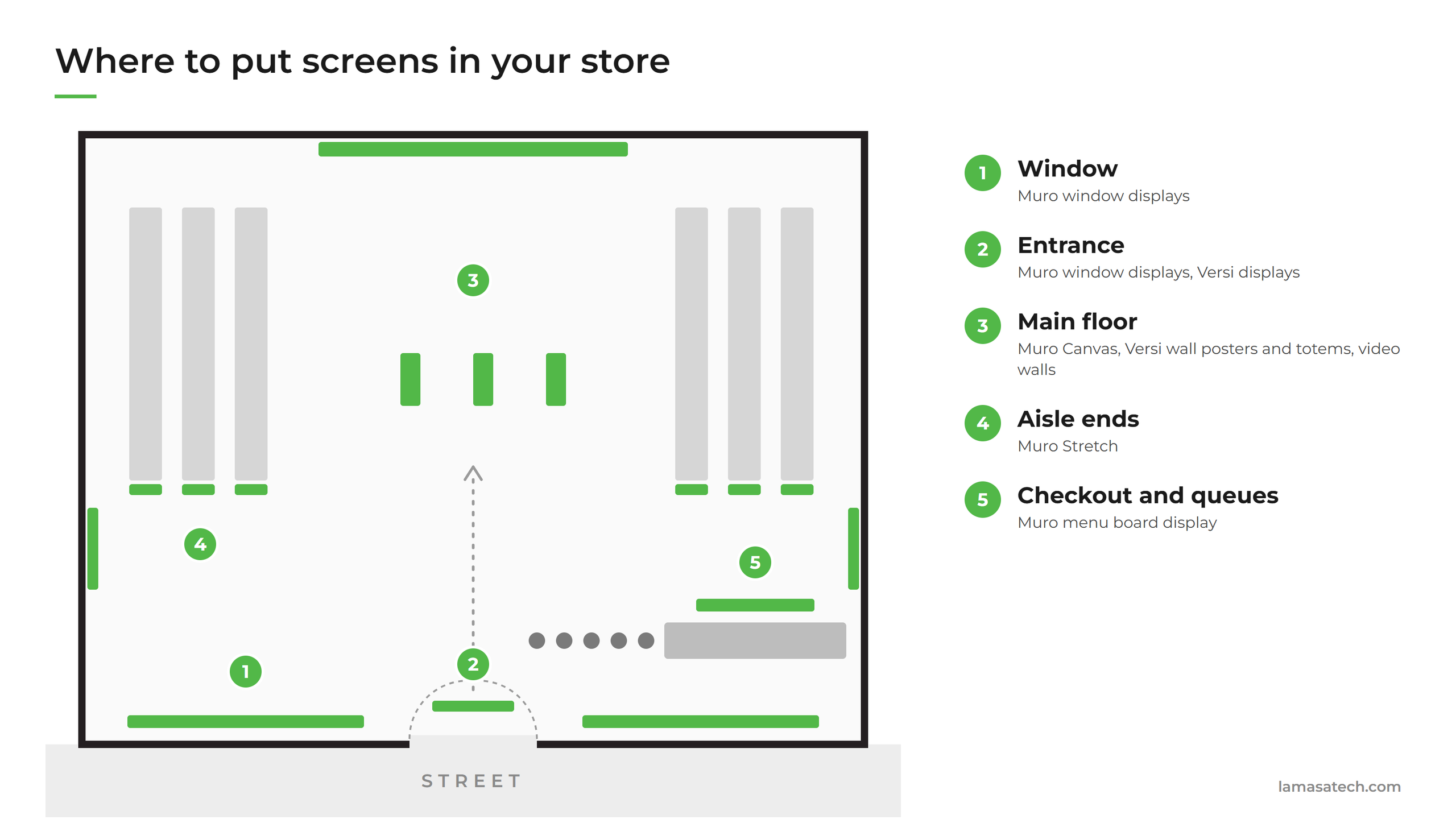
Put screens where shoppers already slow down or stop: the window, the entrance, the main floor, the ends of the aisles and the checkout. Each of these places has a different job, so each needs a different kind of screen.
A window screen has to win against daylight and catch someone walking past at pace. A checkout screen is read by a queue with time to spare. Treating them as the same thing is why so much digital signage in retail underperforms.
What is the best place for a screen in a shop window?
Hang it just inside the glass, facing the street, and choose it for brightness first. Behind glass in daylight, brightness decides whether a message is read or ignored.
Our Muro window displays are ultra-high brightness, at 3,000 nits or more, so they stay readable in daylight through glass. The double-sided Muro UHB runs much brighter towards the street than into the shop, so one screen serves both audiences without dazzling the people inside. It hangs from the ceiling on arms or wires, or stands on a base, so the window stays the display surface and no wall is lost. It is available in 49″, 55″ and 75″ sizes, which also answers a common question about what screen sizes work for retail window displays: the size follows how far away people will see it from.
Two practical rules from our installation guidance:
- South-facing windows always need an ultra-high-brightness display, whatever type of glass you have.
- Keep the screen at least 100 to 150mm from the glass, unless the glass has heat and UV blocking treatment.
Because the display runs 24/7, the window keeps working after the shop has closed. Our guide to digital signage window displays covers the choices in more detail, and you can see the range on our digital window displays page.
Should you put a screen at the store entrance?
Yes, if you can. The entrance is the one place every shopper passes. It is also the hardest place for a screen to work: entrances are glazed, bright and busy.
That is the position Co-op Media Network was in, and it is covered in the example below. The short version is that brightness and glare resistance matter as much at the door as they do in the window.
Where do screens work best on the shop floor?
On the main floor, use screens for the content people want to look at for a few seconds: promotions, new ranges, wayfinding. The right screen depends on the wall or space you have.
- A flush wall display such as the Muro Canvas sits flat to the wall in 21″ and 27″ sizes, reads as part of the interior and offers optional touch. It is a close-range screen, for someone standing in front of it. The same range of slim-profile Muro displays suits store walls generally.
- A framed wall poster such as the Versi Indoor Wall Mount Poster comes in 32″, 43″ and 55″ sizes, hides the cabling and has room for your branding on the frame.
- A freestanding totem or kiosk gives you a screen where there is no wall. The Versi Indoor totem comes in 43″ and 55″ sizes, single or double-sided, with optional touch. See our kiosks range for interactive options.
- A video wall suits a feature wall or a large open area. Our LCD video walls tile 55″ and 65″ panels with gaps as small as 0mm to 3.5mm, and our LED video walls have no bezel at all. Our guide to video wall technology in retail has examples.
Touchscreens and kiosks also answer a question retailers ask about interactive campaigns: if you want shoppers to do something on the screen, rather than just watch it, put it in reach on the main floor.
Where should screens go at the aisle ends?
Put them at the end of the aisle, facing the people walking towards it, with a single message tied to the products beside them. This is where a screen can sit closest to the shelf and the decision.
Aisle ends, and shelf edges are long and narrow, so a standard 16:9 screen either does not fit or wastes the space. The Muro Stretch is a bar-shaped display made for exactly these places. It comes in sizes from 16.4″ to 43.8″ plus custom cuts, runs 24/7 and is light enough to go above products on a shelf without a structural mount. It is an indoor display, at 500 nits, which suits bright store interiors.
Our post on digital endcap displays in retail covers how to get the most out of the space.
Is it worth putting digital signage at the checkout and in queues?
Yes. A queue is the one place in a store where people are standing still and looking for something to read. A screen here has more time to be read, and it is close to the point of purchase.
The Muro digital signage and menu board display suits queue-facing information and point-of-sale signage. It comes in 32″, 43″, 55″ and 65″ sizes, in portrait or landscape, with an 8mm bezel, so two or three screens side by side read as one surface. The Versi Indoor range also lists checkout and self-service among its uses.
How many screens does a store need?
There is no standard number. Start with the places above and ask what a shopper should do at each one. One screen with a clear job in each zone does more than several screens that repeat each other.
Co-op Media Network began with 300 initial locations, with plans to reach 1,000, across a network of about 2,400 stores. You can do the same: start with the places that matter most and add screens where they prove their worth.
What size screen should you use in each part of the store?
Size follows viewing distance. A window screen is read from the pavement, so it is large and bright. A flush wall screen is read from a step away, so a 21″ or 27″ display is enough. An aisle-end bar is read from a few metres away down the aisle. We do not give one ideal size for the whole store, because there is not one; the spec sheets for each display give the sizes available.
A real example: Co-op Media Network at 300 store entrances
Co-op Media Network (CMN) wanted to expand digital displays at its store entrances so that FMCG brands could reach customers as they walk in, and people passing outside. Its network covers about 2,400 stores across the UK.
The brief was demanding. The screens had to be readable in direct sunlight, energy efficient, tough enough for busy entrances and easy to fit to different window sizes while keeping a uniform look. They also had to meet Co-op’s ethical trading standards.
LamasaTech, working with transformation specialists Commercial, was chosen as hardware supplier after a tender. We supplied displays for 300 initial locations, with plans to reach 1,000:
- Muro ultra-high-brightness window displays for entrances, foyers and windows facing daylight.
- Versi displays with anti-glare toughened glass.
- A mounting system designed for quick, flexible installation across different store layouts.
- A built-in system-on-chip, so no separate signage player is needed and content can be updated remotely across all screens.
You can read the full story in our Co-op Media Network contract news, or see how Co-op drives FMCG success with front-of-store displays.
How do you know if your in-store screens are being seen?
Count the people, not just the plays. A screen can play an advert hundreds of times without anyone being there to see it, so the play count says little about the audience.
That is the shift behind IAB Europe’s draft standard for in-store retail media, which starts measurement from footfall. DisplayPulse, our audience measurement software, counts the real-world audience in front of a screen, anonymously and on the device. Our sister post on how to measure who sees your in-store screens explains the standard and what it means for retailers.
If you want to see how much footfall your screens are missing, DisplayPulse has a footfall calculator that shows what unmeasured footfall may be costing you, and a footfall counter that counts people at every entrance.
A short checklist before you place a screen
- Can shoppers see it from where they naturally stop or slow down?
- Is it bright enough for the light at that spot, with glass or sunlight in the way?
- Does the content suit how long people will look: a few seconds at the window, longer at the checkout?
- Does the mounting suit the space, whether wall, ceiling, shelf or floor?
- Do you have a way to count who sees it?
If you would like help choosing screens for your stores, talk to our team or read more on digital signage best practices.